Watch for meaning, replay for listening, save for later. This learning workflow runs on the website, not inside the extension.
Before you start
- Open Listening library on the ThomLingo website.
- Choose an English video with accessible captions, up to 90 minutes. Sign in to save vocabulary and listening progress.
Screenshots may use English or Vietnamese interface labels. Follow the numbered arrows and the instructions below.
1. Start with a video you would watch anyway
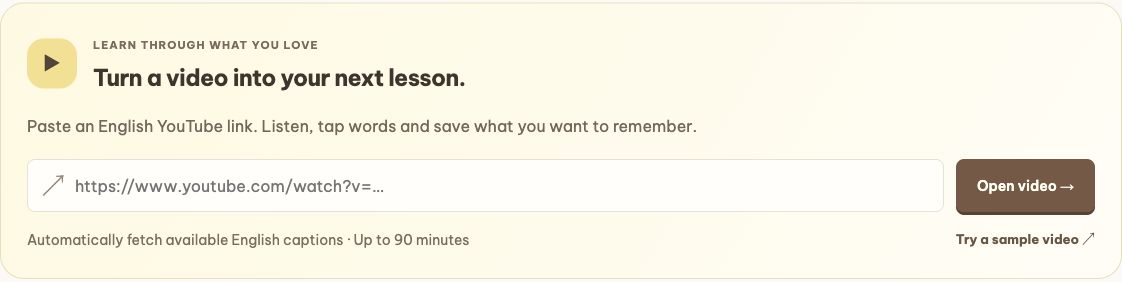
Pick a topic you already like: an interview, a product talk, a cooking explanation or a story. Paste the YouTube link into Listening library and choose Open video. If you are just exploring, use the sample video first.
ThomLingo retrieves available English captions; it does not generate a transcript for every YouTube video. If captions cannot be retrieved, try another video or an approved transcript from the library.
Enlarge the annotated screenshot
On a small screen, swipe the image sideways to see every detail.
Current website import form. No extension is needed for this step.
- Paste your YouTube link here.
- Choose Open video, or try the sample link below.
2. Listen first, then let the transcript help
Watch a short part once and see how much you catch. Follow the timed transcript when you need support, or hide it to give your ears another try. You do not have to understand every word before moving on.
Tap a timestamp to return to a line. Adjust the playback speed or use Repeat current line for a phrase that went by too quickly. Work on a short moment instead of replaying the whole video.
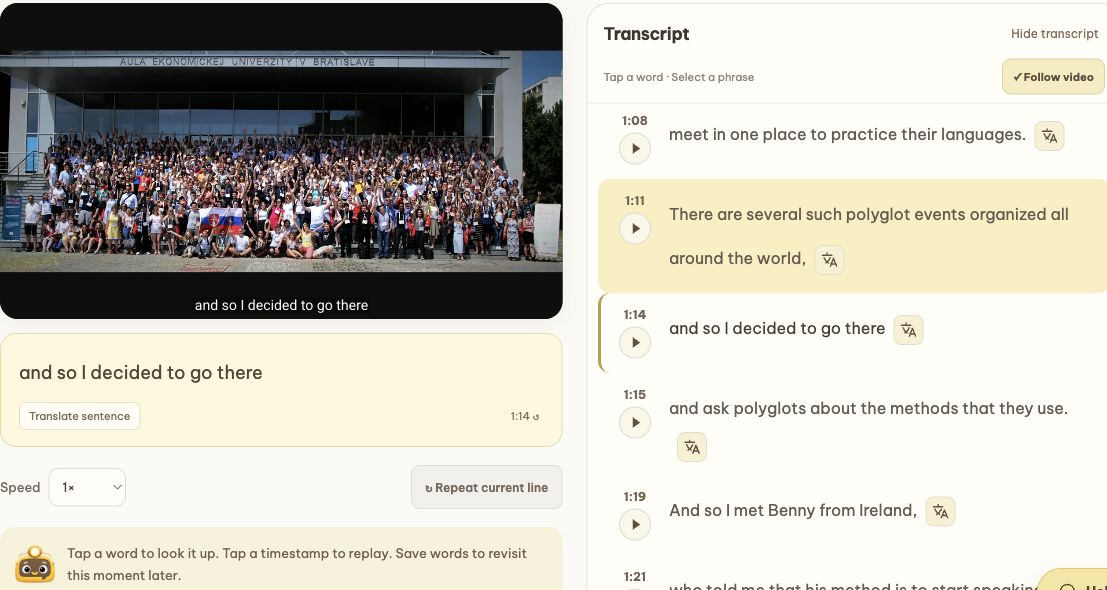
Enlarge the annotated screenshot
On a small screen, swipe the image sideways to see every detail.
Actual website study screen using the TED sample video. Video: TED / Lýdia Machová; shown to explain the controls.
- Hide or show the transcript.
- Use a line’s timestamp/play button to hear it again.
- Repeat the current line; playback speed is on the left.
3. Turn “I almost got it” into “now I get it”
Tap a word in the transcript to look it up, select a phrase, or choose Translate sentence when the whole line is unclear. Then listen once more with that meaning in mind.
Save a few words worth meeting again. Their video context and timestamps help you return to the moment you first heard them. Captions and machine translations can contain mistakes, so use context rather than memorizing an odd line blindly.
4. Leave with one sentence you can say
Try a ten-minute session: watch a short section, replay one tricky line, save up to three useful words and say one sentence aloud. That is a complete session, even if the video still has twenty minutes left.
Sign in to keep listening history and your position. Next time, continue where you stopped and review the words you saved in your wordbook.
Useful links
Try it while you are curious.
Open Listening library →